 1 / 10
RetroNET Diagnostics
Full NABU hardware diagnostic: video, sound, keyboard, joystick, HCCA and RAM tests with a RetroNET mission-control look, a techno/dubstep sound test and a burn-in mode that runs until you stop it.
Play in your browser
This runs a real NABU PC in the page: the original ROM boots and loads RetroNET Diagnostics over an emulated NABU Internet Adapter, the same way it loads on real hardware. Click the screen to type into the NABU.
How to run
- Open the Internet Adapter or Headless menu on your NABU or in MAME.
- Go to the Utilities channel category.
- Select RetroNET Diagnostics and it will load.
About
A full hardware diagnostic for the NABU PC, dressed up like a RetroNET network operations console. Pick a test from the menu and it runs until you press ESC, or start BURN-IN to loop the tests forever while it counts passes and failures.
Tests
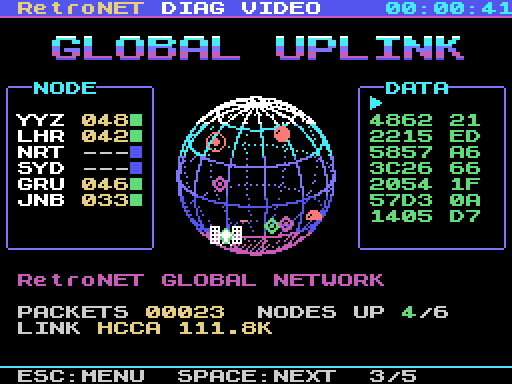
- VIDEO - scans all 16K of video RAM without disturbing the picture, with a live block map plus data-bit and address-line lights. Measures the vsync rate, checks the 5th-sprite and collision flags, then bounces 32 sprites. Then comes the RetroNET GLOBAL UPLINK: a spinning wireframe globe with city nodes, orbiting satellites and data packets, followed by colour bars and an alignment grid.
- AUDIO - writes and reads back every AY-3-8910 register, sweeps all three tone channels, the noise generator and the envelope shapes, then plays SIGNAL DROP, an original techno track with a dubstep wobble-bass drop, with level meters and a spectrum display.
- KEYBOARD - an on-screen keyboard that lights each key as you press it and remembers the ones you've tested. Also shows the raw key codes and the keyboard's own status and error bytes. Press ESC twice to leave.
- JOYSTICK - both ports, every direction and the fire button.
- HCCA - pings the Internet Adapter and graphs the round-trip time, reads the adapter's version and clock, and measures streaming throughput.
- RAM - a non-destructive test of all 64K (the running program included), a March C- test of free memory and an address-line test. A 256-block map shows any bad block and which data bit (which RAM chip) failed.
- BURN-IN - loops video, audio, HCCA and RAM with a report after every cycle.
Controls
- Menu: arrow keys or joystick + RETURN/fire, or press 1-7.
- ESC or NO returns to the menu. SPACE skips to the next part of a test.
Notes
F18A and PICO9918 video boards may not set the 5th-sprite flag, so the sprite check can show FAIL on those boards even when nothing is wrong.