NABU-86 PC Emulator
Group: Headless Menus • Author: DJ Sures
Created 2026-11-14 • Updated 2026-11-14Boot an IBM PC/XT and MS-DOS 6.22 on your NABU. NABU-86 uses the newly found Z80 register bank 2 to emulate an 8086. Drive C: is your Internet Adapter: run NABU programs, read the news and use DOS tools at C:\>.
You can find NABU-86 PC Emulator in the Headless Menus category. To run this, look in the Internet Adapter or Headless menu on the NABU/MAME and navigate to the Headless Menus channel category and select NABU-86 PC Emulator.
NABU-86 runs an IBM PC/XT-compatible machine on an unmodified NABU PC. It boots a PC BIOS, starts MS-DOS 6.22, and gives you a C:\> prompt. Drive C: is your Internet Adapter.
No hardware modifications, no expansion cards and no floppy drive are needed. The only requirement is a NABU and an Internet Adapter (2026.11.12.00 or newer).
Background: Z80 register bank 2
The Z80's documented programming model has a main register set, an alternate set (AF' BC' DE' HL'), the index registers IX and IY, and the internal W/Z temporary latch that the CPU uses during 16-bit operations.
In 2025, a die-level study of decapped Z80A parts (Zilog and SGS second-source) found a third register file on the die, next to the alternate set. We call it bank 2. It holds:
| Register | Width | Notes |
|---|---|---|
IX'' |
16 | shadow of IX |
IY'' |
16 | shadow of IY |
SP'' |
16 | shadow of SP, used by the bank-2 stack ops |
WZ'' |
16 | latched copy of the internal W/Z register |
The bank is reached through an undocumented prefix chain. A prefix sequence of ED 7x (where x is 0, 1, 4 or 5) changes the meaning of the next DD or FD prefixed instruction. That instruction then targets the bank-2 register instead of the main one. The behaviour is consistent across every NMOS Z80A we tested.
Nobody found this in the 1970s and 80s for two reasons. Every one of these ED 7x sequences is documented as a 2-byte NOP, and on their own they are NOPs. They only do something when the very next instruction carries a DD or FD prefix.
Opcode page 3
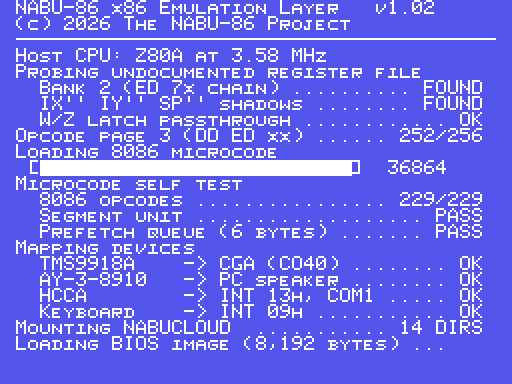
A second discovery is a mostly unused opcode page reached with DD ED xx. 252 of its 256 encodings decode to useful operations. These are mostly 16-bit moves between the bank-2 registers and the main set, plus a few that read the W/Z latch directly.
Why this matters for the 8086
What stops a Z80 from emulating an 8086 at a usable speed isn't really the instruction set. It's the register state. The 8086 has four segment registers (CS, DS, ES, SS), and every memory access adds one of them (shifted left 4 bits) to an offset. A software emulator has to keep those in memory and do that arithmetic on every access, which costs tens of cycles per instruction.
With bank 2, NABU-86 keeps the segment registers in the CPU:
| 8086 | Z80 (NABU-86) |
|---|---|
| CS | IX'' |
| DS | IY'' |
| SS | SP'' |
| ES | WZ'' |
| AX BX CX DX | HL' DE' BC' + AF' |
| SI DI BP | IX IY + shadow RAM |
| IP | PC (microcode-relative) |
| prefetch queue | page 3 latch |
Segment arithmetic becomes one page 3 instruction, and the 8086's 6-byte prefetch queue sits in the page 3 latch.
The microcode
NABU-86 is not an interpreter in the usual sense. At start-up it loads 36 KB of 8086 microcode from the Internet Adapter into shadow RAM. Each 8086 opcode maps to a short sequence of Z80 and page 3 instructions, and dispatch is one indirect jump through a 256-entry table.
Measured over the 8086 instruction mix of a typical DOS program, NABU-86 takes about 1.31 Z80 cycles per 8086 cycle. At the NABU's 3.58 MHz, that works out to an effective 4.77 MHz, the same speed as an original IBM PC/XT.
The loader runs a self test of all 229 documented 8086 opcodes before it hands control to the BIOS.
Memory
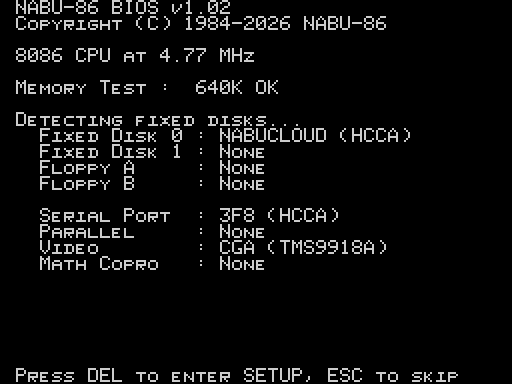
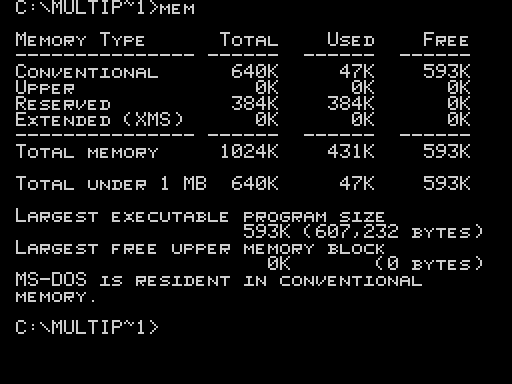
The NABU has 64 KB of RAM, and the microcode and shadow RAM need most of it. The remaining 576 KB of conventional memory is paged in over the HCCA port from the Internet Adapter ("cloud RAM"). Pages are 4 KB and are prefetched by segment, so MS-DOS sees a full 640 KB. MEM and CHKDSK report it as normal conventional memory.
Devices
| PC device | NABU hardware |
|---|---|
| CGA (40 columns) | TMS9918A text mode |
| CGA (80 columns) | F18A, if fitted (detected at power on) |
| PC speaker | AY-3-8910 channel A |
| INT 13h fixed disk C: | HCCA → Internet Adapter (HCCA.SYS) |
| COM1 | HCCA |
| INT 09h keyboard | NABU keyboard |
| Floppy drives | none (the NABU never needed one) |
Drive C:
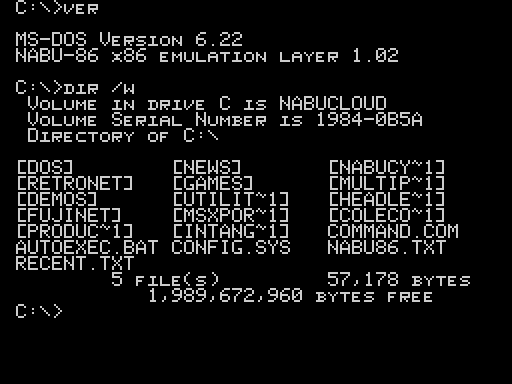
HCCA.SYS is a block-device redirector. It presents the Internet Adapter as a FAT16 fixed disk with the volume label NABUCLOUD:
- Every NABU channel category is a directory in the root. Long names are shortened to 8.3 the standard way, so
MultiplayerbecomesMULTIP~1. - Every program in a category is an
.EXEfile. C:\NEWSholds every news article as a.TXTfile, andC:\RECENT.TXTis the latest one.C:\DOSholds the MS-DOS 6.22 utilities.
The drive is read only. Anything that writes gets a Write protect error and the usual Abort, Retry, Fail?.
Native NABU programs
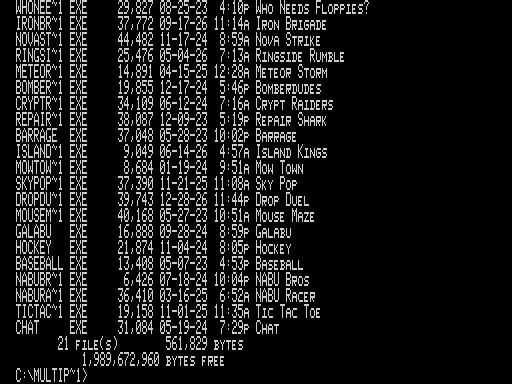
The NABU programs on drive C: aren't 8086 code. NABU-86 recognises them by their header and hands them straight to the Z80, so the NABU restarts into that program at full native speed. To DOS this looks like any other .EXE, so you can run a NABU game from the C:\> prompt by typing its name.
Using it
- Run NABU-86 from the Utilities category (or set it as your Internet Adapter's headless program and the NABU boots straight into DOS).
- The loader probes the register file, loads the microcode and runs the self test.
- The BIOS runs its power-on self test. Press DEL for CMOS SETUP, or ESC to skip the memory test and fast boot.
- MS-DOS starts and you get a
C:\>prompt.
Things to try
C:\>VER
C:\>DIR /W
C:\>CD MULTIP~1
C:\MULTIP~1>DIR
C:\MULTIP~1>WHONEE~1
C:\>TYPE RECENT.TXT
C:\>CD \NEWS
C:\NEWS>TYPE <TAB>
C:\>MEM
C:\>CHKDSK
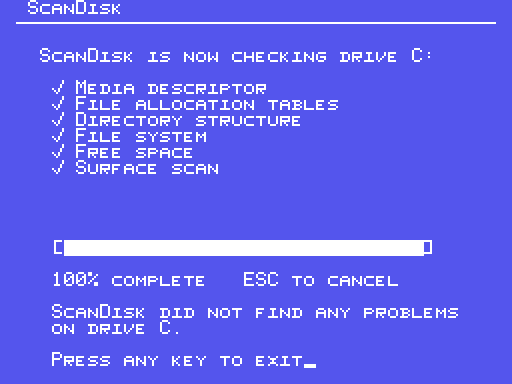
C:\>SCANDISK
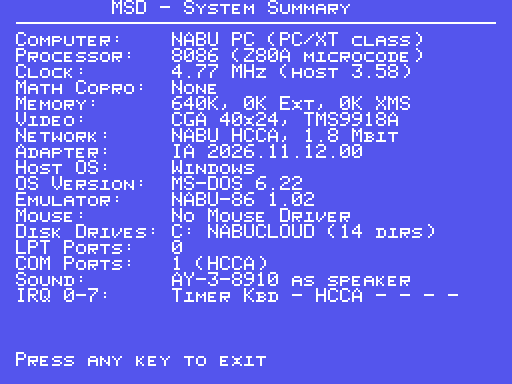
C:\>MSD
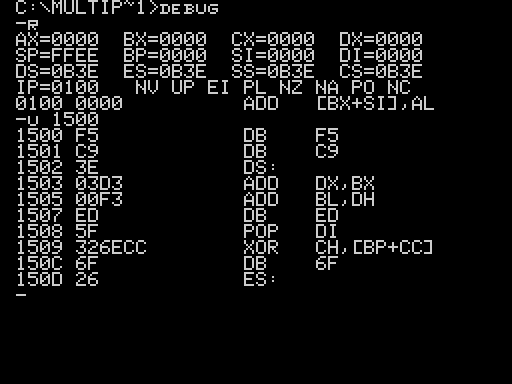
C:\>DEBUG
-R
-U
-D
-Q
C:\>NABU86 /?
- TAB completes file and directory names; press it again to cycle through the matches.
- UP / DOWN recall earlier commands (DOSKEY is loaded by
AUTOEXEC.BAT). - ESC clears the line.
DIRsupports/W,/P,/A,/Band wildcards (DIR LODE*).- With an F18A, NABU-86 boots in 80 columns, and
DIRalso shows each program's long name.MODE CO40andMODE CO80switch between the two.
Included MS-DOS 6.22 utilities
ATTRIB, CHKDSK, DEBUG, DEFRAG, DELTREE, DOSKEY, EDIT, EMM386, FDISK, FORMAT, HELP, MEM, MODE, MOVE, MSD, QBASIC, SCANDISK, SMARTDRV, SYS, TREE, XCOPY, plus the internal commands (CD, CLS, DATE, DIR, ECHO, PATH, PROMPT, SET, TIME, TYPE, VER, VOL ...).
Known limitations
- 8086 only. There are no 80286 or 80386 instructions, so
EMM386and Windows won't run. - 80 columns needs an F18A. On a stock TMS9918A, programs that require 80 columns (QBasic, EDIT) refuse to start.
- Drive C: is read only.
- No floppy drives.
A:andB:reportNot ready. This is by design. - Timing-sensitive PC software that relies on exact 8253 timer behaviour may run at the wrong speed.
- CMOS SETUP settings are not saved, because there's no CMOS. The date and time come from the Internet Adapter.
FAQ
Does this work on CMOS (Z84C00) Z80s? The NABU shipped with NMOS Z80A parts, and that's all we've tested. Early results suggest the Z84C00's bank 2 behaves the same, but page 3 decodes differently. If you've replaced your CPU, please report your results.
Why MS-DOS 6.22 and not an earlier version? 6.22 is the last stand-alone MS-DOS and the best tested on an XT-class machine. It also has DOSKEY, which makes the 40-column screen much more pleasant.
Is this slower than a real PC? For 8086 code it runs at about the speed of a 4.77 MHz XT. Native NABU programs run at full speed because they never go through the microcode.
Can I run my own PC programs? Drive C: is read only in this release. Writable storage through the Internet Adapter's file store is planned.
NABU-86 v1.02 · DJ Sures · https://nabu.ca
Screenshots